
OEM Robotic Bending: Precision Automation for Custom Metal Fabrication
2026-10-26
Ask any fabricator about robotic bending and you'll often hear about flexibility—but not everyone realizes how far precision has come. HUNSONE is redefining OEM robotic bending for custom metal fabrication, combining automated tool changes with real-time angle correction to hit tolerances that were once reserved for high-volume runs. If you’ve been wrestling with setup bottlenecks or inconsistent bends, this deep dive will show you what’s actually possible when robotics and metal forming meet.
Why Custom Metal Shops Are Quietly Swapping Manual Brakes for Robotic Cells
Walk into a custom metal shop today and you might notice something missing: the rhythmic stomp of a foot pedal on a press brake. In its place, the low hum of servo motors and the occasional beep of a vision system. Shop owners aren't making a big announcement about it—they're just quietly moving the old manual brake to the back corner, maybe keeping it for one-offs, while a robotic cell handles the repeat bends. The shift isn't flashy, but it's happening one job at a time.
Part of the reason is staffing. A skilled brake operator takes years to train, and when they call in sick or retire, the whole shop feels it. A robotic cell doesn't need a lunch break, doesn't get repetitive strain injuries, and can run lights-out after the last human goes home. For custom shops that live on short runs and tight turnarounds, the math starts to make sense even if the upfront price tag stings. The robot doesn't care if the bend sequence is long or the material is high-tensile—it just follows the program, every single time.
What often tips the scale is the quiet predictability. Manual bending has a human factor—a slight variation in force, a misread angle, a second guess on springback. Robotic cells with angle correction close that loop automatically. Add to that the growing availability of offline programming software that lets a shop simulate the entire bend sequence before touching steel, and even a small shop can take on complex parts without tying up their best operator for hours. It's not about replacing people; it's about turning a bottleneck into a background process.
Teaching a Robot to Respect Springback, Grain Direction, and Tooling Wear
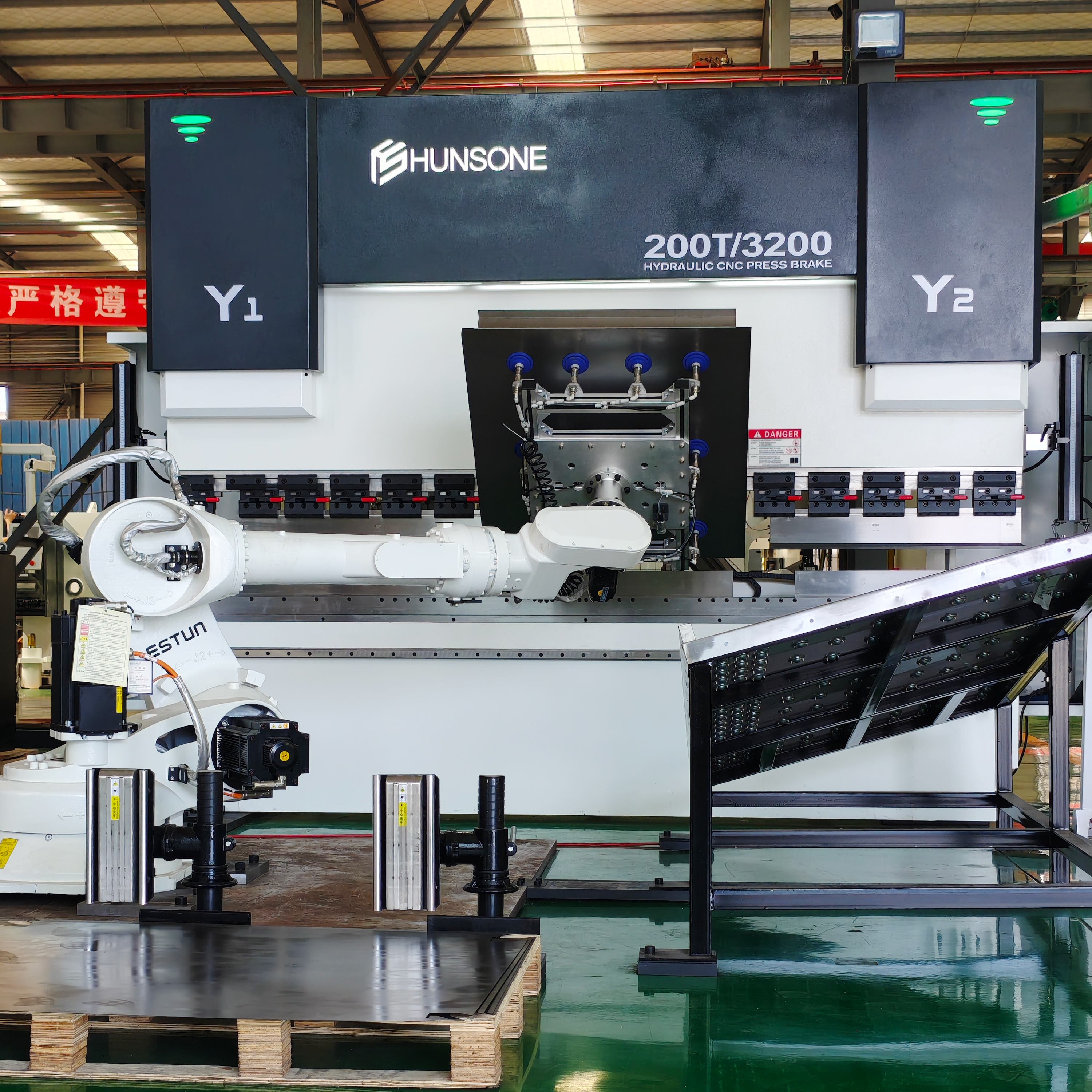
Springback is the first hurdle. You can program a robot to bend a flange to 90 degrees, measure the result at 92.3, and then watch the next part come out at 91.5 because the batch of stock came from a different coil. A fixed offset won't survive contact with reality. Instead, the robot's control loop has to compare commanded angle against post-bend feedback and nudge the overbend parameter after every cycle—not unlike a press brake operator tweaking the ram depth based on a quick angle gauge reading.
Grain direction complicates that loop further. Aluminum or CRS sheared parallel to the rolling direction behaves differently than the same thickness cut across it. If the robot doesn't know the blank orientation, it will chase springback values that shift every time the nesting software rotates a part. One practical fix is to attach grain direction to the digital twin and let the path planner adjust bend sequence, clamping force, or even approach speed when the bend line runs cross-grain. That small step removes a lot of variation that otherwise looks like random noise.
Tooling wear is the slow variable that can ruin both of the above corrections. A die radius that has polished itself wider over 10,000 hits will produce a larger springback angle for the same commanded stroke. The robot can detect this drift if it monitors bending force and back-off distance after each cycle, flagging when the force signature shifts outside a learned band. At that point, the system should either compensate on the fly or stop for a quick die inspection rather than quietly producing scrap until the next scheduled maintenance.
Offline Programming That Doesn't Ask Welders to Become Software Engineers
On the shop floor, a welder's skill lives in the arc, the puddle, the angle of the torch. The moment you hand them a screen full of coordinate systems, joint configurations, and simulation trees, you've pulled them away from what they do best. Good offline programming should feel like an extension of the weld cell, not a detour through a developer environment. The interface needs to speak the language of weld sequences, torch angles, and travel speeds—not Python scripts or API calls. When the software respects the welder's existing mental model, programming a complex part becomes no more intimidating than teaching a new trainee.
The real test of any offline programming tool is whether a welder with ten years of hands-on experience can sit down and get a usable path without a manual. That means no hidden menus for inverse kinematics, no requiring them to define tool center points from scratch, and definitely no expectation that they understand how the motion planner interpolates between waypoints. Instead, the system should infer constraints from the physical setup—the positioner's range, the robot's reach, the fixture's clamping points—and present options as simple choices: start here, weave this way, pause for repositioning. If the software asks a welder to debug a singularity, it has failed its core purpose.
Too many platforms try to bridge the gap by turning welders into part-time programmers, loading them with tutorials on coordinate frames and teach pendant syntax. That approach wastes months and breeds resentment. A better path is to hide the complexity entirely. Let the welding engineer or integrator set up the cell once, including all the tricky kinematic relationships, so that the daily user only sees a clean, visual layout of the part and the welds. Drag a weld from one seam to another, adjust the weave width with a slider, simulate the full sequence to check for collisions, and then export. The welder stays a welder—they just happen to be programming the robot by doing their job, not someone else's.
Handling Short Runs and Odd Geometries Without Losing Setup Time
Short runs and odd geometries punish shops that treat every job as a brand-new setup. A better move is to lean on zero-point clamping and modular fixturing: once the base plates are dialed in, swapping pallets takes minutes instead of half a shift. Even for one-off parts, a standardized grid of locating holes lets operators reuse proven offsets rather than re-indicating from scratch.
Odd geometries often fail standard vises and chucks. Instead of forcing a square peg into a round hole, machine soft jaws to match the part profile, or print a contoured nest overnight. These custom workholding pieces can be staged offline on spare pallets, so the spindle doesn’t sit idle while the operator wrestles with clamps and parallels.
Programming also plays a role. CAM templates with predefined toolpaths and feeds for common features—bosses, pockets, threaded holes—let you drop in a new model without rebuilding the wheel. Add on-machine probing to locate irregular stock automatically, and you can hit tight tolerances on the first part even when the blank looks nothing like a neat rectangle.
How Real-Time Angle Correction Changes What's Possible on a Press Brake
When the angle sensor feeds data back to the CNC during the bend, the machine stops guessing. Instead of relying on a pre-calculated depth that assumes uniform material, the ram adjusts in real time to hit the target angle. This matters most with high-strength steel, where springback varies from sheet to sheet, and with mixed batches that used to require constant test bends and manual corrections.
The effect on workflow is more interesting than the sensor itself. Operators can set up a job once, then let the brake handle differences in thickness, grain direction, and even temperature drift. Multi-bend parts with accumulated error suddenly become practical without shimming or rework, and automated cells can keep pace without a person checking angles with a protractor between hits.
Keeping a Robotic Bending Cell Productive When the Mix Changes Every Shift
The assumption that a robotic bending cell can only handle long runs of identical parts breaks down quickly when every shift brings a new mix. Operators often spend more time swapping grippers, adjusting backgauges, and re-teaching corner positions than actually forming metal. The real productivity killer isn't the robot speed—it's the pause between one part number and the next. Shops that thrive with high-mix schedules treat changeover as a core process, not an afterthought.
One approach is to group parts by shared bending profiles rather than by customer or due date. If a cell can move from a 90-degree bracket to a similar channel without a full tooling change, the robot keeps moving. Smart scheduling software can help, but even a simple visual matrix on the shop floor works. The goal is to reduce the number of times the operator has to touch the cell, because every manual intervention resets the rhythm.
Another overlooked lever is offline programming. When the next mix is already simulated and collision-checked before the current job finishes, the cell doesn't wait for a programmer to stand at the teach pendant. Pair that with quick-change tooling and standardized finger setups, and a robotic bending cell becomes as flexible as a manual brake—without losing the repeatability that justified the investment.
FAQ
It pairs programmable robotic arms with press brakes or panel benders, letting a fabricator handle complex bends, varying lot sizes, and quick changeovers without hard tooling for every profile. The robot positions the blank, follows the bend sequence, and often checks angles between steps.
Modern systems combine offline programming, angle measurement feedback, and adaptive gripper control. The robot can compensate for springback and slight material variation mid-process, so a single prototype can meet the same dimensional targets as a large batch.
Most setups handle mild steel, stainless, aluminum, and coated sheet from roughly 0.5 mm up to 6 mm or more, depending on the press force and tooling. The key is matching end-of-arm tooling and bend sequences to material behavior, not just thickness alone.
It removes much of the physical handling and guesswork from high-mix work. You gain repeatable cycle times, less rework from misloaded blanks, and the ability to run lights-out for repetitive steps while still switching between part numbers within minutes.
Yes, if the setup uses quick-change grippers, automatic tool changing, and programs stored by part number. A well-organized cell can switch from one bracket to a completely different enclosure in under ten minutes, often with only a few manual checks.
Parts with consistent reference edges, enough flat area for vacuum or magnetic gripping, and bend sequences that avoid collisions between the robot, tooling, and part tend to work best. Adding locating holes or tabs early in the process also boosts reliability.
It shifts the role toward programming, setup verification, and process improvement. Skilled press brake operators become cell leads or offline programmers, using their bend knowledge to refine sequences rather than lifting and aligning every part by hand.
Conclusion
The quiet shift away from manual press brakes in custom metal shops is not about chasing automation for its own sake. It is driven by the need to handle short runs, odd geometries, and tight delivery windows without losing hours to setup. A robotic bending cell paired with offline programming lets a shop move from CAD file to formed part without forcing welders or brake operators to become software engineers. The robot is taught to respect material quirks such as springback and grain direction, and to adjust for tooling wear. Real-time angle correction closes the loop, measuring each bend and nudging the ram or robot path before the next stroke. This turns what used to be an art into a repeatable process that still tolerates variability in sheet stock.
What keeps these cells productive when the mix changes every shift is not rigid automation but software that absorbs variation. A robot can switch from one part number to another with tool changes measured in minutes, not hours, because recipes are stored digitally and probes verify critical angles. Offline programming means the next job is ready while the current one runs, so a mix of ten different brackets does not trigger ten different setup nightmares. Tooling wear is tracked automatically, and bend allowances shift with observed springback rather than relying on a static table. For OEMs and job shops serving custom metal fabrication, this combination of angle feedback, quick changeover, and operator-friendly programming creates precision automation that is not brittle. It bends what the customer actually needs, not just what a traditional brake cell can handle.
Contact Us
Contact Person: James Chen
Email: [email protected]
Tel/WhatsApp: 86 13770803946
Website: https://www.hunsone.com/